
Text editor options greyed out? | Syracusefan.com

Text editor options greyed out?

OttoinGrotto

2023-24 Iggy Award Most 3 Pointers Made
Joined
Aug 26, 2011
Messages
71,632
Like
229,177
Heyo, as of maybe a day or two ago I suddenly have very limited options on my text editor. Can't hold or italicize, or do fun stuff like add pics/emojis/gifs. In the upper right there's a paper and magnifying glass still, but when I click on it nothing happens. This is on Chrome, Android.
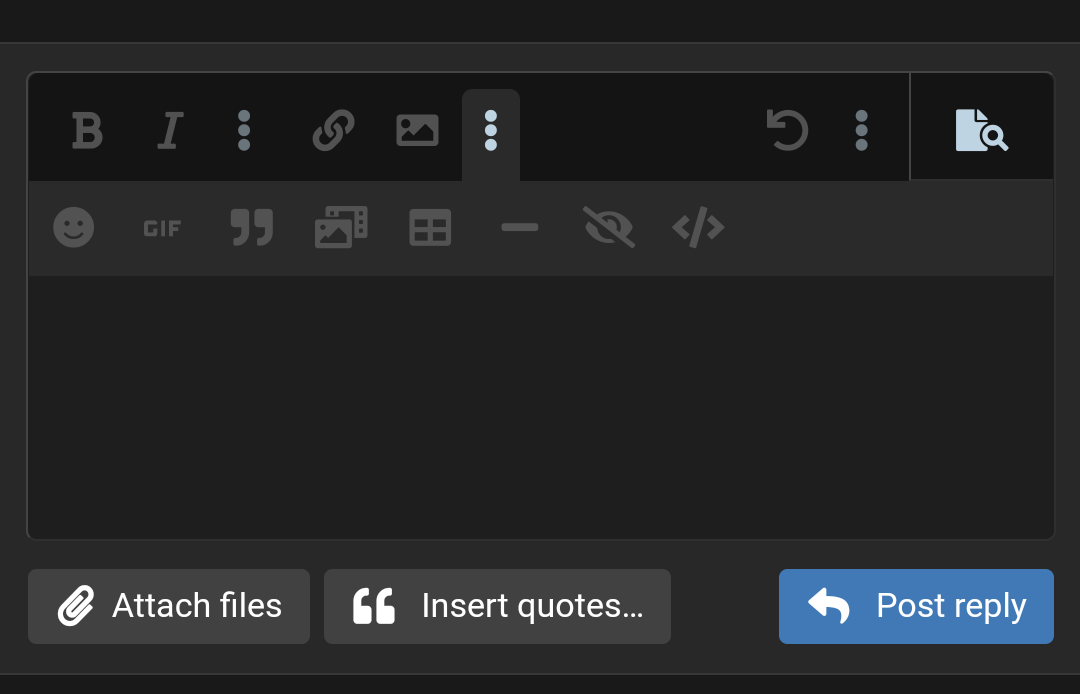
Screenshot_20220307-164403.png


How do I fix this? I'm guessing I fat fingered a setting or something.
 
Heyo, as of maybe a day or two ago I suddenly have very limited options on my text editor. Can't hold or italicize, or do fun stuff like add pics/emojis/gifs. In the upper right there's a paper and magnifying glass still, but when I click on it nothing happens. This is on Chrome, Android.

View attachment 215284

How do I fix this? I'm guessing I fat fingered a setting or something.
They’re trying to make you conform
 
Heyo, as of maybe a day or two ago I suddenly have very limited options on my text editor. Can't hold or italicize, or do fun stuff like add pics/emojis/gifs. In the upper right there's a paper and magnifying glass still, but when I click on it nothing happens. This is on Chrome, Android.

View attachment 215284

How do I fix this? I'm guessing I fat fingered a setting or something.

Looks like you might have gotten into preview mode. Try to click on the icon that looks like a piece of paper with a magnifying glass to the side. Assuming you can see that.
 
Heyo, as of maybe a day or two ago I suddenly have very limited options on my text editor. Can't hold or italicize, or do fun stuff like add pics/emojis/gifs. In the upper right there's a paper and magnifying glass still, but when I click on it nothing happens. This is on Chrome, Android.

View attachment 215284

How do I fix this? I'm guessing I fat fingered a setting or something.
If I'm seeing your screen shot correctly, it looks as if you clicked the Preview button (at the top right - an icon of a page with a magnifying glass). It lets you see what your post will look like if you hit Post Reply. Click this again and the options should not be greyed out.
 
Looks like you might have gotten into preview mode. Try to click on the icon that looks like a piece of paper with a magnifying glass to the side. Assuming you can see that.
Yeah, I can see it, and I try to click on it, but nothing happens.
 
Yeah, I can see it, and I try to click on it, but nothing happens.

Oops - I see now that you can't click the Preview button, is that correct? How about trying to click the 3 dots next to the Preview button, then click the [ ] button. This toggles BB code (which is just another way for techies to use the Bold, Smilies, etc.).

See if this works.
 

Forum statistics

Threads
175,289
Messages
5,345,464
Members
6,234
Latest member
SUtoga

Online statistics

Members online
243
Guests online
10,569
Total visitors
10,812


Top Bottom